GO_exercise_1.6_solution
Step 1: Find the publication in PubMed with the following ID: 8663200
Step 2: Use the search record of this publication in PubMed to obtain this data entry in the Nucleotide database (hint: via links on PubMed page)
Step 3: Display FASTA, GenBank and Graphics
Step 4: Download the GenBank formatted flatfile
Step 5: Open in text editor to view the file
Step 1: Find the corresponding record (from exercise 1.1.) in the ENA database
Step 2: Download the EMBL format (TEXT format)
Step 3: Compare the GenBank format file (from exercise 1.1.) and the EMBL format file. What are the differences?
Step 1: Search the Nucleotide database for the transcript from exercise 1.1. and restrict search records to the RefSeq database collection
Step 2: Find out how many alternative transcripts are known today for Drosophila melanogaster eIF-4E (hint: use filters for species and database). How many different RefSeq records?
Step 3: Go back to the PubMed publication of exercise 1.1. and obtain this data entry in the RefSeq database (hint: via links on the PubMed page)
Step 1: Find the human hemoglobin alpha protein in UniprotKB. What is the entry name?
Step 2: Look at the different sections of information in Swiss-Prot: names, general annotation (comments), ontologies, interactions, sequence annotation (features), references, cross-references (e.g. to 3D structure)
Step 3: Look at the flatfile TEXT. What other formats are available?
Step 4: Save the sequence of the human hemoglobin alpha protein in FASTA format from Uniprot
Step 5: Save the GFF formatted list of features
Find the following paper in PubMed: The DCC gene has a role in cellular differentation and colorectal tumorigenesis. Hendrick et al. 1994.
-Find the Swiss-Prot entry for the DCC precursor. Which residues comprise the signal sequence?
Find the GO annotation for the human PAX6 in UniprotKB and on http://geneontology.org/. Find the GO annotation for the mouse Pax6 in Mouse Genome Informatics. Find the GO annotation for the fly ey in FlyBase.
-Wat is the function of PAX6/Pax6/ey? Is it conserved?
-In which developmental process is PAX6/Pax6/ ey involved? Is that conserved?
-What is the cellular localization of PAX6/Pax6/ey?
-Which organism has the most associations (for PAX6 at http://geneontology.org/)?
Search for cardiac development at http://geneontology.org/.
-What is the correct GO term and identifier? (Hint: use " " to specify your search)
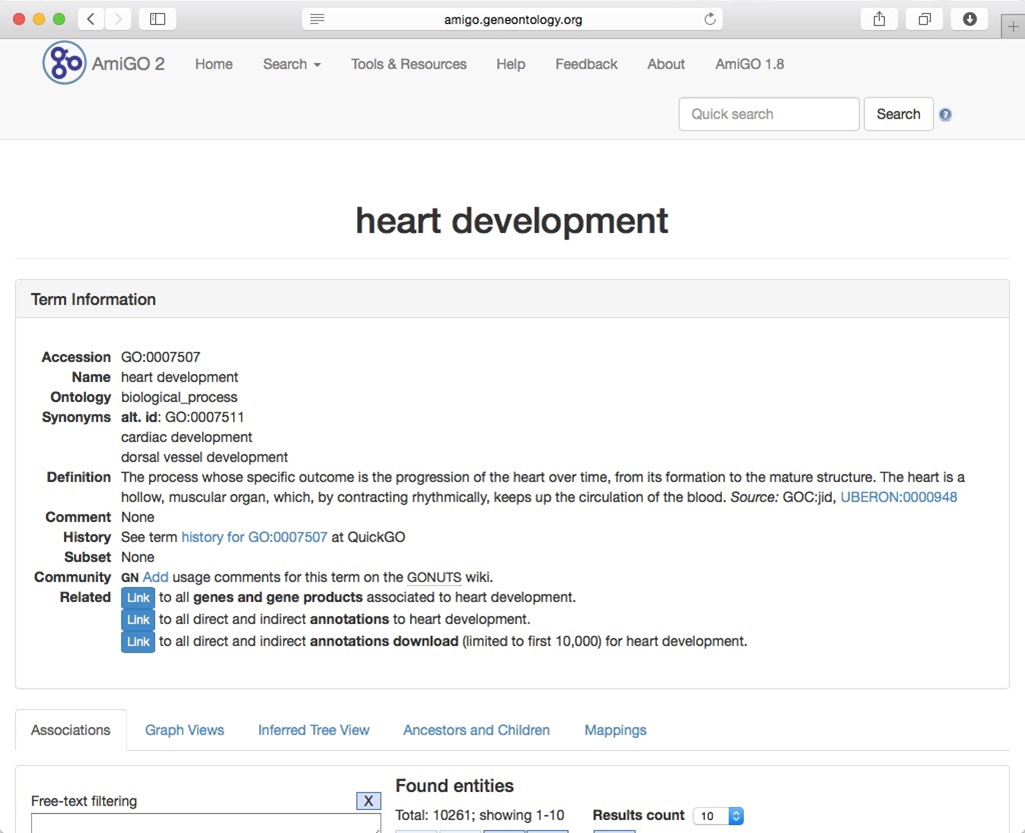
Solution: Searching for cardiac development will give you heart development as correct GO term. Clicking on this term will lead you to the Term Information page about this GO term and provides you the GO accession number.
GO_exercise_1.6_solution
-How many human gene products are known to be involved in cardiac development? And how many mouse gene products?
-How many GO terms are direct child terms of cardiac development?
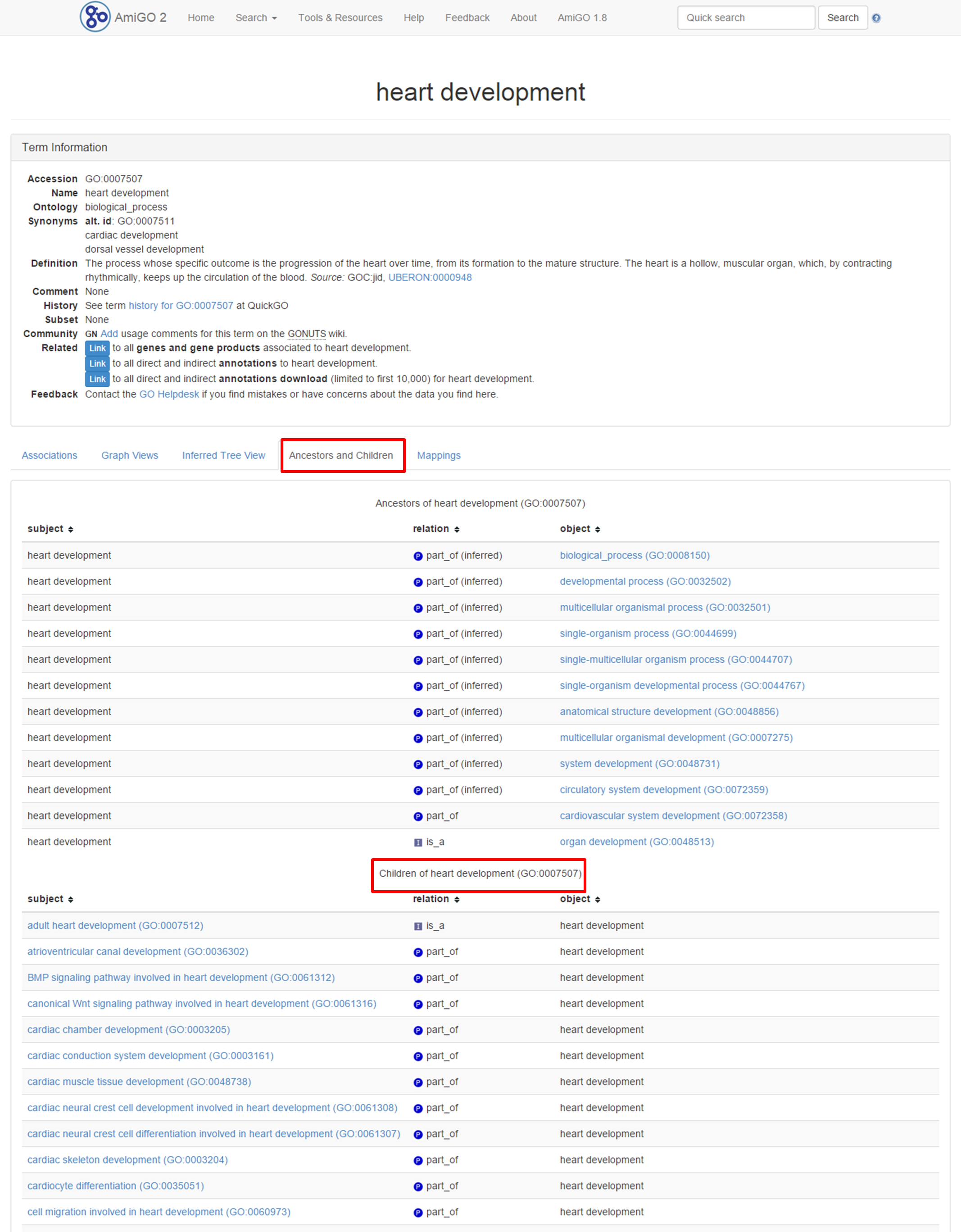
GO child terms heart development
-Download all annotations in a tab delimited text file.
How many genes are associated with Huntington Disease (HD), with Alzheimer's disease (AD) and with Parkinson's disease (PD)?
Solution:
OMIM ID for:
Huntington's disease: #143100
Alzheimer's disease: #104300
Parkinson's disease: #168600
Search for the TP53 gene and download the genomic sequence of the longest transcript, including 5'UTR, CDS exons, 3'UTR and introns by using View > DNA and via Genomic Sequence on the transcript page.
Hints and tricks:
Obtain 10 kb upstream sequence of the TP53 (uc002gij.3) transcript variant 1.
Go to the following location on chromosome 3 (Human Mar 2006 assembly): 120,564,000-120,610,000
-Which gene is located here?
-Which genes are upstream and downstream of this gene?
Search the eIF-4E transcription factor from Drosophila Melanogaster
-Can you find back the 7 RefSeqs?
-Are there UCSC genes annotated in the Drosophila genome?
Find a coding exon of the TP53 gene that is more than 250 bp long.
-How many non-synonymous coding SNPs are known in this exon?
-Retrieve the DNA sequence of this exon.
-Design primers to amplify this exon using Primer3.
-Test whether these primers generate a unique amplicon with the in silico PCR tool on the UCSC Genome Browser.
Search for the human PCNA gene.
-How many different transcripts are known?
-How many proteins?
-Are there any regulatory elements annotated? Hints and tricks:
Use the ORegAnno track (in the human hg18 assembly)
Search for simple repeats on chromosome 4 in the human genome with a copy number > 10 and download the sequence.
Find simple repeats (copy number >10) within known UCSC Genes and download the sequence.
How many genes are located between the STS markers SWXD113 and DXS52?
Download a FASTA file containing all human 3'UTR sequences.
Download a FASTA file containing all human 1 kb proximal promotors.
Find the signal peptide sequence of the human DCC gene and use BLAT to locate this sequence in the human genome.
-How many hits does BLAT give?
-If you BLAT the same sequence against the mouse genome, do you also find a hit?
How many transcripts does Ensembl predict for the human gene ACHE?
Find the mouse orthologue of the human SSBP4. Does this gene have paralogues?
Choose a disease in OMIM
-Choose a disease-associated gene (how? follow links)
-What kind of information is available?
-Start with Entrez Gene, link further to Homologene (through mouse gene and MGI), UCSC, Ensembl
-Also look at description, GO annotation, genomic structure & isoforms, gene expression, interaction, structure
-How many publications for the human gene; and for the mouse gene?
-Are there invertebrate homologs?
For the gene from Exercise 1.14.: Start from Entrez Gene, link to the RefSeq mRNA in the NCBI Nucleotide database, the RefSeq protein in NCBI Protein database, and the Swissprot protein in UniProtKB
-What features are available?
-Be familiar with EMBL, GenBank, FASTA, GFF, and BED formats where appropriate
-Be able to download these files to your PC (File save as text + open with text editor)
Find genomic location of your gene in UCSC and Ensembl Genome browsers
-Understand RefSeq, UCSC genes, Ensembl genes
-Be able to work with Tracks in UCSC and in Ensembl
-Look at conservation track: which features are most conserved?
Step 1: Finding the gene associated with a disease
-What is Marfan syndrome? What are the phenotypic traits of Marfan syndrome?
-What is the cause of Marfan syndrome? Run a Google search.
-Go to the OMIM database and search for Marfan syndrome. Do you find the same gene? What is the disease-associated gene?
Step 2: Get more information about your gene
Hints and tricks:
Check the links in your OMIM gene page for more information:
-What is the Ensembl Gene ID of your gene?
-How many different transcripts are there for your gene according to Ensembl database, how many of them are translated?
-In which tissue does your gene have a high expression? (Hint: Check the BioGPS link under the Gene Info section.)
-What are the other diseases that your gene is associated with?
Check the links in your NCBI gene page for more information:
-What is the Gene ID of your gene in NCBI database?
-What is the RefSeq Gene ID of your gene?
-What are the Gene Ontology terms associated with your gene?
-What is the name of the mouse homolog of your gene?
-How many publications are there for the for your gene in human? In mouse?
-Are there any invertebrate homologs?
Step 3: Visualization of your gene in a genome browser
Go to UCSC Genome Browser and find your gene. You can either go directly to UCSC or you can follow links from OMIM or NCBI gene pages:
-How many exons does your gene have? (Don't count, find where it's written)
-Look at the expression of your gene, does it correspond with your previous results?
-What is the name of the 2 neighboring genes?
-Open the conservation tracks, which parts of the gene show have high conservation? (You might need to zoom in to see clearly)